|
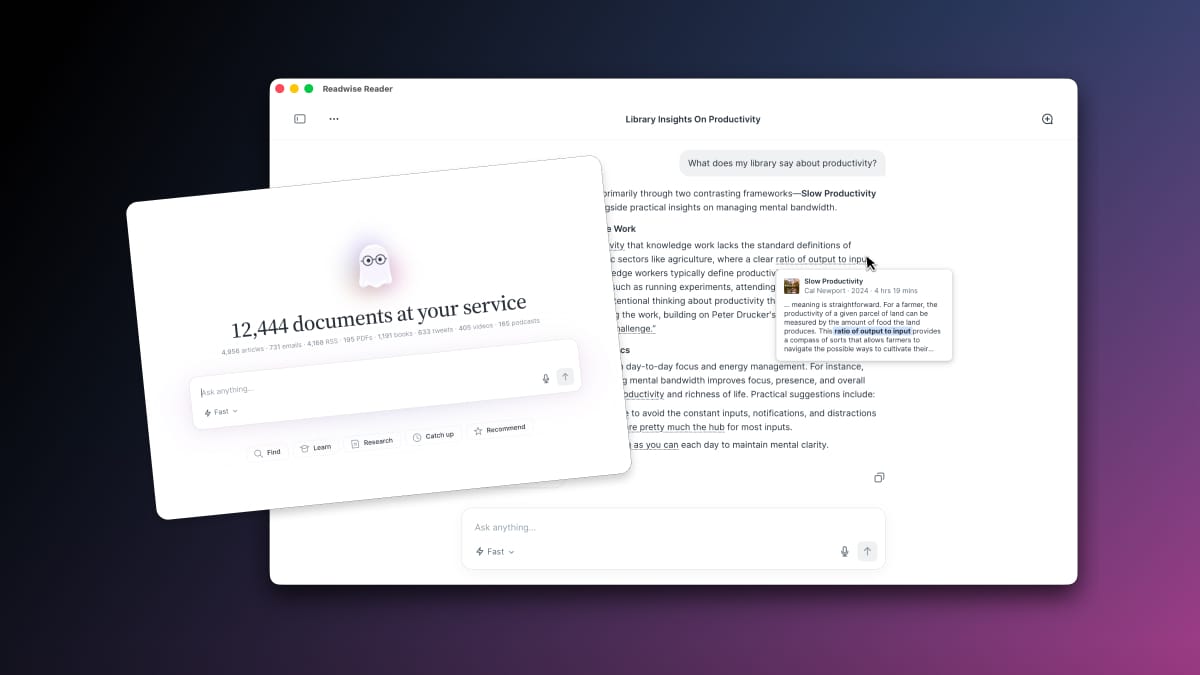
Hi all, It's Tristan again, and I'm thrilled to share Reader Public Beta Update #14. As usual, I'll go over the latest round of major updates to Reader. This one includes a huge update to Readwise (highlights) too! I apologize that it's been 8 months since our last update email (though we have posted consistent updates to the changelog). As I'm sure most of you know, the software world has changed a lot since the start of 2026, so we've been working overtime to make sense of it all 😛 But we've got much to share, so without further ado, let's get into it! Some of the new features below were foreshadowed in previous updates such as Global Ghostreader while others are surprises like Quick Lookup and a complete rebuild of the Readwise mobile app. - 🌎 Global Ghostreader (web/desktop) — You can now chat with your entire library rather than just a single document. The possibilities here are endless, but the core use is getting an answer grounded in everything you've ever saved with citations linking back to the referenced passages. Ghostreader can even perform meta-tasks like moving documents, adding tags, and so on.
- ✨ Readwise 2.0 — We rebuilt the classic Readwise mobile app from the ground up: fresh design, smoother animations, much faster, better search, new ways to capture, and more. This isn't about Reader per se, but it's such a leap, it's worth sharing here.
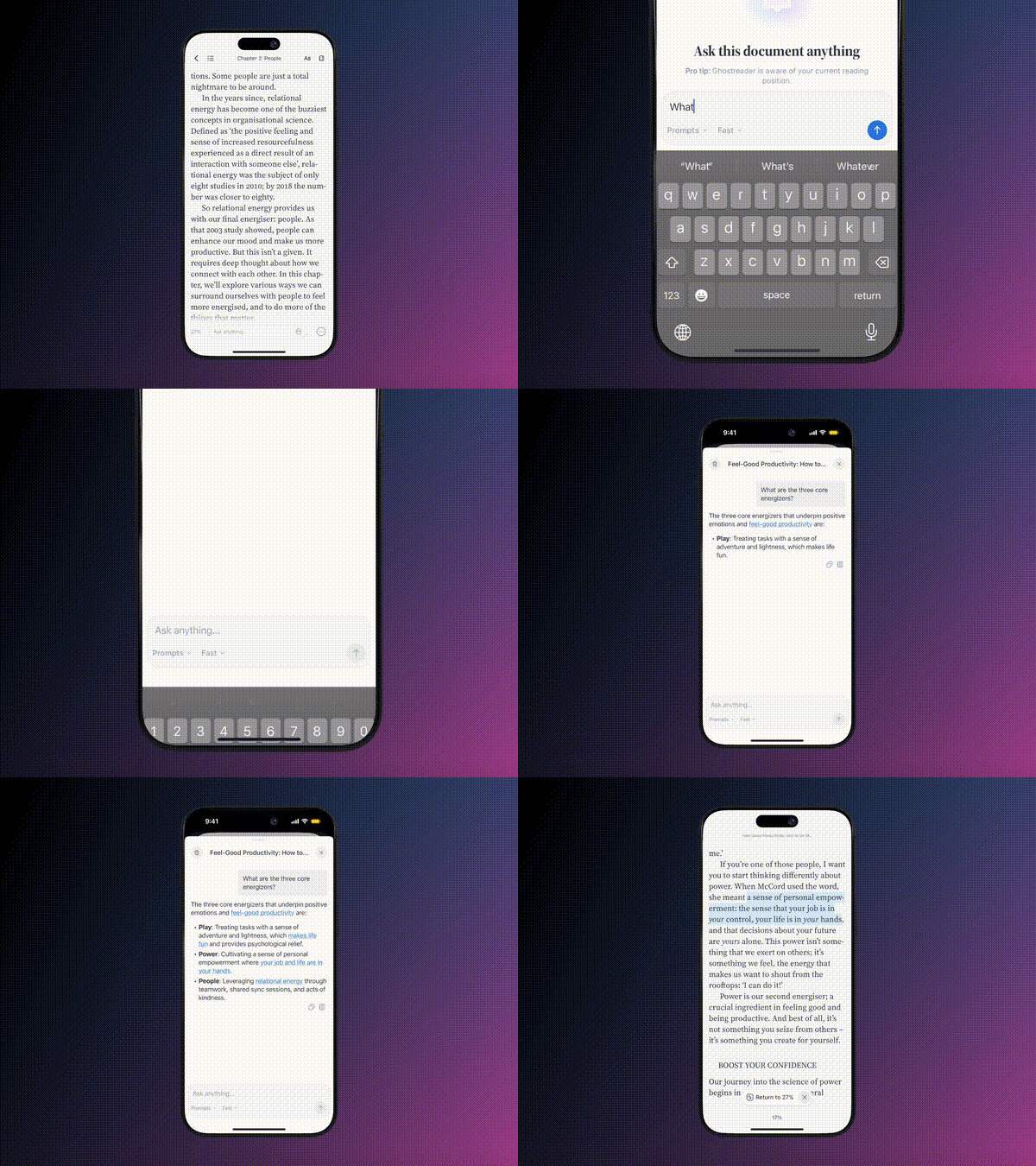
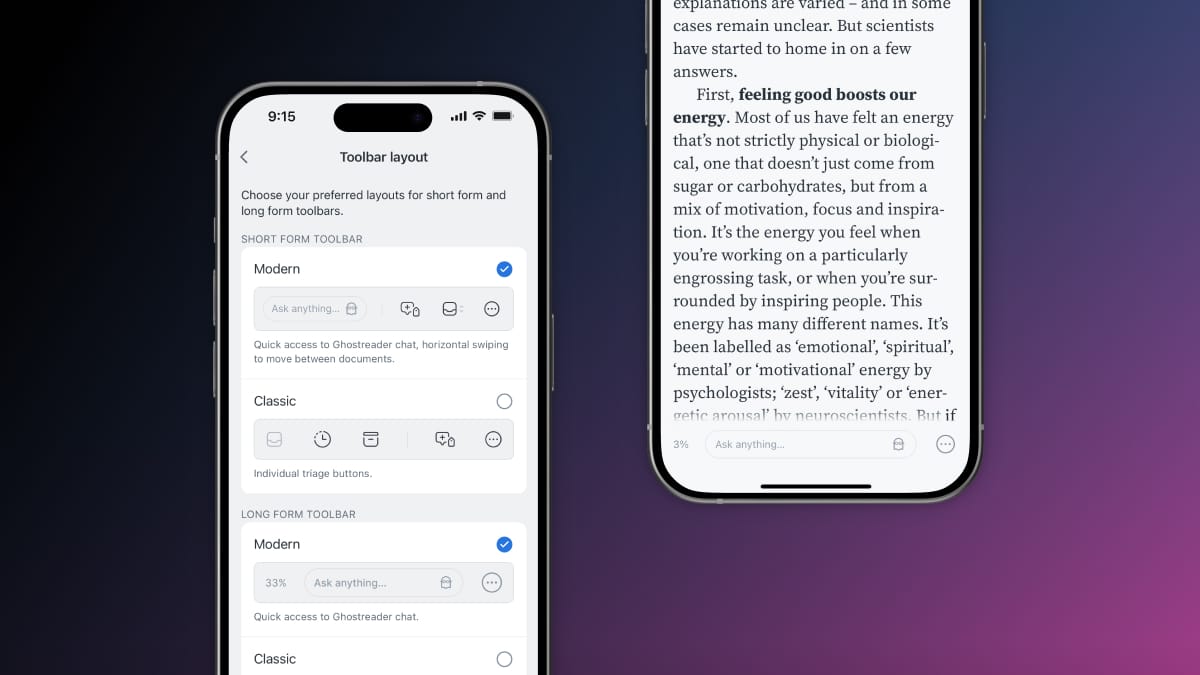
- 📱 Mobile Chat — You can now chat with a document in the Reader mobile app without breaking your reading flow. Making this experience feel seamless on a phone-sized screen required a significant update to the bottom toolbar, enabling us to incorporate additional (much requested) functionality such as swiping through documents and easier deleting.
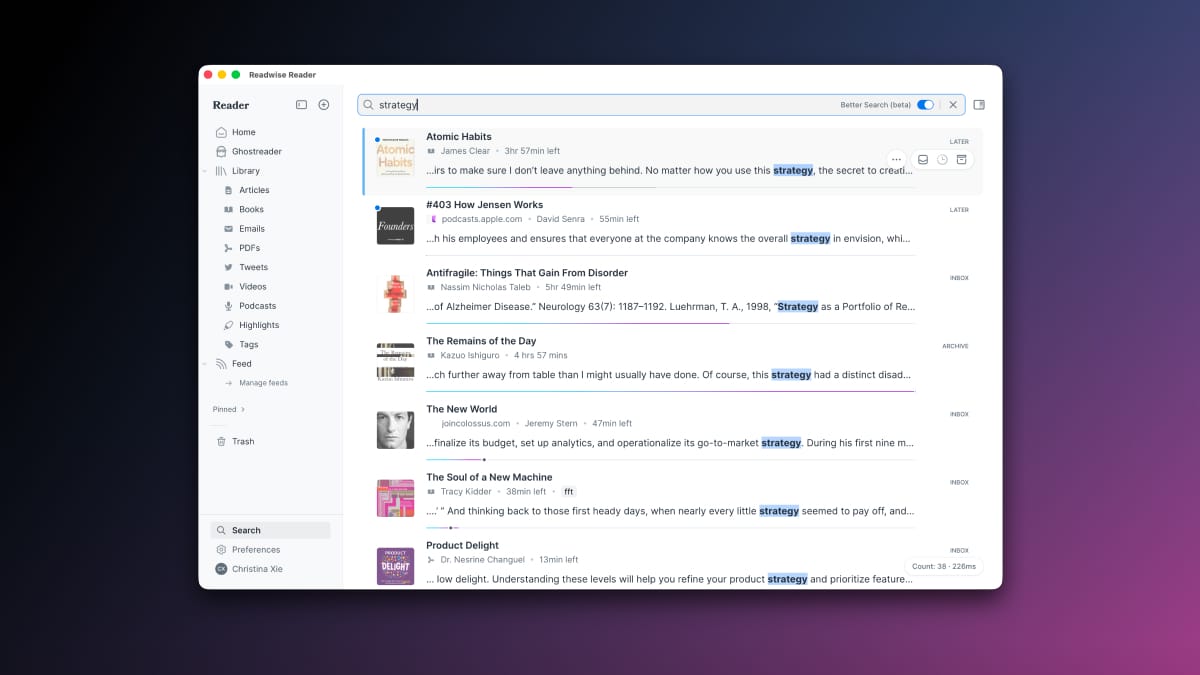
- 🔍 Better Search — We rebuilt Reader search, again. This means more relevant results, consistent results across devices, and faster speeds.
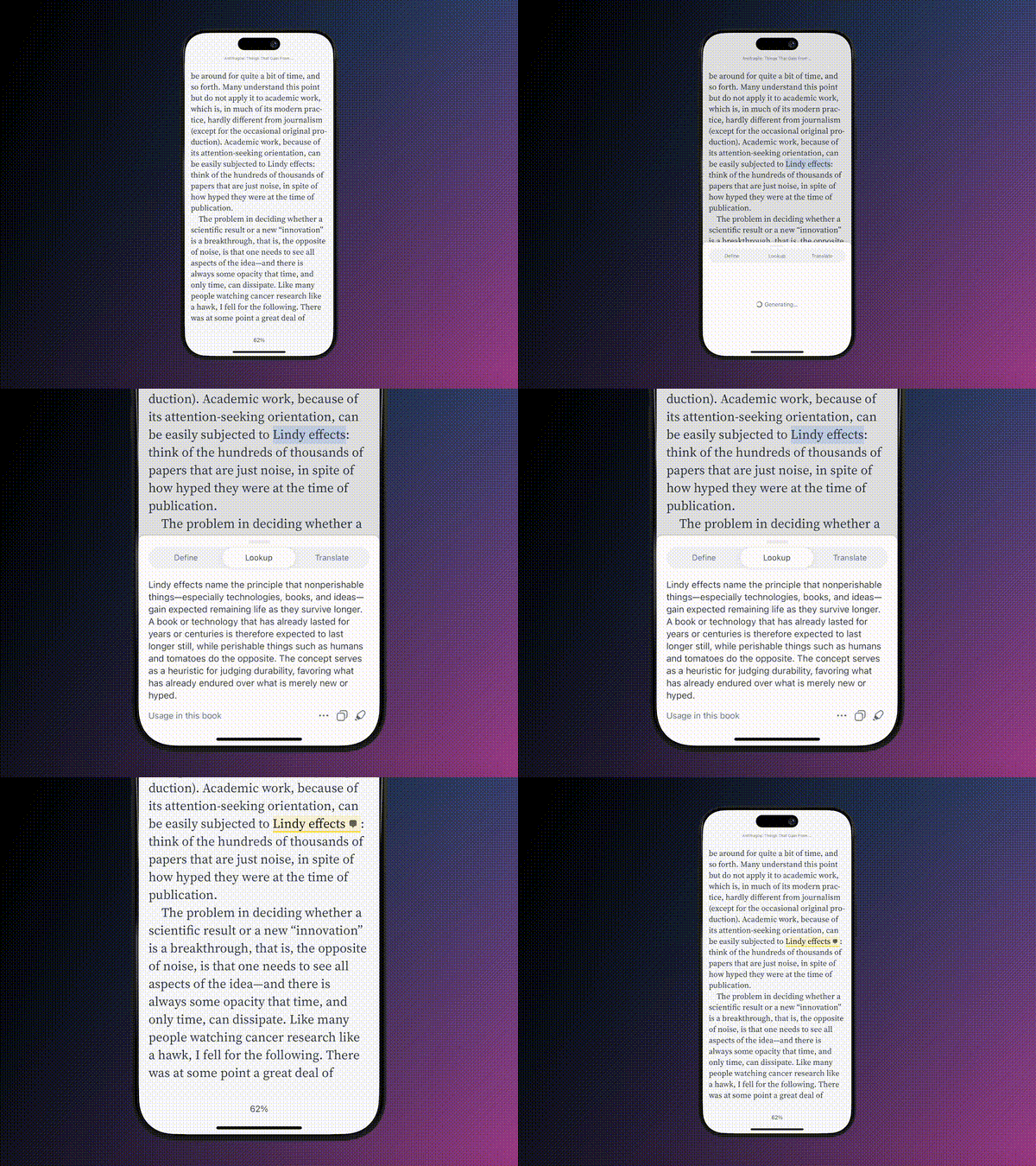
- 📖 Quick Lookup (mobile) — Long-press any word or phrase to quickly see its dictionary definition, internal usage, or translation. Because this feature uses an LLM, the definitions are specific to surrounding context, terms are defined in the author's own meaning, and translations work in any language.
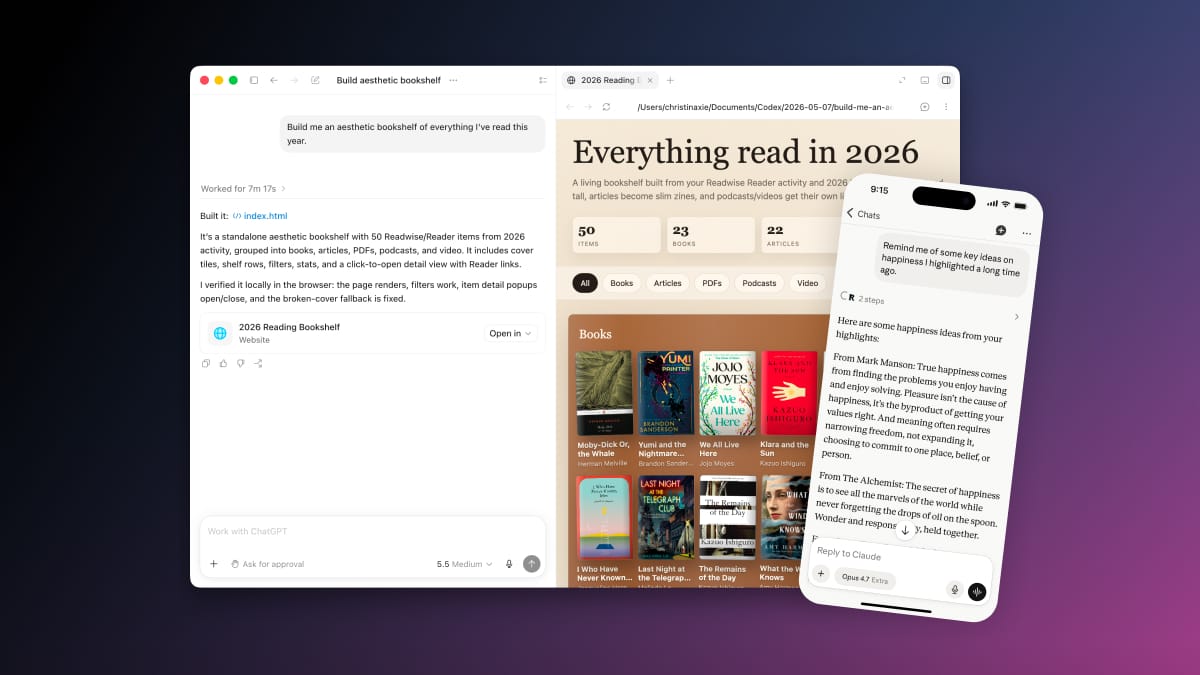
- 🤖 Readwise MCP/CLI — Anything you've saved to Reader and Readwise, your AI agent can now use as context or perform operations on. Search across every word in your Reader library, triage your inbox, organize your data, and so much more. Connect from Claude, ChatGPT, OpenClaw, Perplexity, Poke, or any other AI app.
As always, there are many more smaller improvements we'll get into, and countless bug fixes as well. 🌎 Global GhostreaderGhostreader now indexes every word of every document and can instantly generate cited answers for you across your full library. Beyond just answering questions, however, Ghostreader can also help you triage your inbox, organize your library, and act as a full-powered reading assistant for you. Try it now: read.readwise.io/ghostreader A few things you can try: - “What have I read about [topic] and what were the most interesting takes?”
- “Help me get through my inbox (or feed!)”
- “Find connections to this idea from other documents in my library [while reading]”
- “I remember saving a PDF about [idea]. Find it for me.”
- “Summarize everything I read this week”
- “What does [author] argue across their essays I've saved”
- “What's my best document on [topic]?”
In our last two updates, we walked you through the evolution of Ghostreader. It started (before ChatGPT even launched) with prompts. Then we shipped single document chat. Now Ghostreader has access to your entire library. Global Ghostreader is now fully agentic too, so this feature goes beyond just finding ideas and making connections. It'll tag your documents, move them between locations, edit metadata, and more. To help you get started, we've shipped this with a set of starter skills like Research a topic, Digest my reading, Triage my inbox, and Find similar. Like any skill system, you can trigger these manually, let the agent decide when to use them, or customize & make your own. As always, any AI-powered feature we build aims to enhance reading, rather than substituting for the reading experience itself. We've found the new Ghostreader to be an incredible aid in this regard and we hope you do too! Let us know how it works for you :) Global Ghostreader is live in the web and desktop apps with a mobile version coming soon! Props to Piotr for leading this massive effort, Kris on design, and groundwork laid by Adam's original chat work. ✨ Readwise 2.0 (Mobile)This is, of course, the Reader update newsletter, but we'd be remiss not to mention (maybe) the biggest update to the original Readwise mobile app ever. We completely rebuilt the Readwise iOS/Android apps from the ground up to be more aesthetic, more native, and more powerful. At its core, it's still the same Readwise. In fact, one of the more unique challenges of this project was preserving all your existing workflows and muscle memory. The apps just finally look and feel as good as they deserve. A few things you'll notice right away: - A beautiful new Home screen — Beautiful review cards, intuitive navigation, and a scrollable feed of recent or random highlights.
- A smoother Daily Review — Cleaner highlights, smoother interactions, and a completion screen worthy of your streak.
- New ways to save highlights — Instantly scan the pen/mark annotations from your paper books, add highlights via voice, as well as modernized versions of the save methods you know and love.
- Upgraded functionality across the board — Search is faster and more accurate, browsing your library is modernized, chatting with highlights is more accessible, the stats screen is more delightful, and so much more!
If you already use Readwise, your highlights, your streak, and every workflow you're used to are exactly where you left them. There's nothing to migrate and nothing to re-learn. Early testers have called this modernization "a quantum leap forward." We hope you'll feel the same. (And if you've never tried Readwise, it's included as part of your subscription, now is a great time!) Grab the latest version of the mobile app on iOS or Android. Over the next few months, we'll be reciprocating this design to the Readwise daily email and web app. Huge props to Johannes, Ibai, and Christina for taking on this giant project and getting it done over the past 8 months. 📱 Mobile ChatThe long awaited mobile version of our “chat with document” feature is now here! Seamlessly ask questions while reading and receive a fast, accurate answer that links directly to the cited text. Ghostreader is aware of your position so you don't need to prime questions with a bunch of context for it to understand what you might be curious about. We know there are many “Chat with PDF” apps out there. In fact, Chat with PDF apps were once a meme in our software category before ChatGPT, Claude, and others completely sherlocked the use case. We ourselves were quite skeptical of chatting with a document because, in general, the existing experiences abstract away the underlying act of reading, which we obviously care quite a bit about preserving. But let's keep it real: The Cassandras predicting the downfall of the conversational interface have thus far been very wrong. Chat seems here to stay and, as more and more people have adopted this behavior, it's hard not to feel the urge to ask an LLM a quick question while reading. So we've scratched that itch while, of course, keeping the reading experience itself front and center! Pulling that second part off required overhauling the bottom toolbar, which I describe in the next section. Huge props to Adam on our team for owning this feature, Kris for designing it, and Artem for some last minute mobile UI/animation heroics to get it over the finish line. To help enable this seamless chat experience, we've updated the bottom toolbar in the reading view. Changing such a core component of the user interface can be disruptive, so we've made this opt-in to start. To try the new toolbar, update to the latest version of the mobile app and enable it at Account > Toolbar Layout (if you don't see it, simply kill and restart the app once). There will also be a one-time prompt in-app to try it out. This new toolbar preserves all the functionality the previous one had while incorporating the ability to ask Ghostreader questions while reading. This also enabled us to address some long-standing feedback folks had including making it easier to delete a document and adding the ability to swipe to the next or previous document in your list without backing out of the document. Again, preserving workflows and respecting muscle memory is important to us, so this new toolbar is optional. We're biased, but we think it's genuinely better, but it's up to you! 🔍 Better SearchIn the last update, we mentioned that the infra powering Global Ghostreader (efficiently indexing your documents) should enable us to improve search. Fortunately, it proved true. Improving search in various ways is one of the most frequently requested upgrades from our users. While the work here isn't finished by any means, you should notice much better search functionality: - Smarter, more complete results: above all else, search should now be more accurate, helping you find the document you were looking for.
- No variance across devices: the old search was local-first, which had some benefits, but would only search the content that had had time to sync to your local device. Especially for users with large libraries, search should now work consistently.
- Fast: no matter the power of your device, or the length of your documents, you should now get instant search results.
- A ton of other smaller fixes: for example, search now will match what you actually see, such as edited titles and metadata, better highlighting of matched results, etc
While the search is still new, we've left it as opt-in from the search page (you'll see a big toggle for “Better Search”). Better Search is live everywhere. Let us know how it works for you! Props to Mati for knocking this out, and Piotr for setting up the infra underpinning it. 📖 Quick LookupIn the transition of Ghostreader from a prompts to chat abstraction, the vast majority of LLM-driven workflows were instantly buffed. There was one use case, which happened to be a user favorite, that would get nerfed: looking up the meaning of a word. Consistent with our approach of elevating particularly interesting LLM use cases into “first class features”, lookups are now built-in with their own bespoke interface. There are three flavors of lookup right now. The first is a straightforward dictionary definition. This feature exists in other reading apps, so it's not necessarily new. What makes this implementation unique is that it uses an LLM instead of a locally-installed dictionary (eg Merriam-Webster) and draws from the surrounding context to give you the precise meaning. In other words, you don't have to filter through, say, 6 potential definitions to determine which one applies to what you're reading. But this comes with the tradeoff that it only works online. The second is a term lookup (sometimes referred to as x-ray). This returns the meaning you would find in a glossary as opposed to a dictionary, but of course very few documents come with a glossary. Behind the scenes, Ghostreader finds all uses of the selected term in the document and then synthesizes that into the author's bespoke usage. This is a particularly important skill in nonfiction reading, known as “coming to terms” [with the author]. We've long been inspired by How to Read a Book by Mortimer Adler who writes at length about this practice. Here's our favorite highlight: “you will find that your comprehension of any book will be enormously increased if you only go to the trouble of finding its important words, identifying their shifting meanings, and coming to terms. Seldom does such a small change in a habit have such a large effect.”
Most reading in Reader is nonfiction, but this lookup variant happens to be especially delightful for fiction too. In addition to neologisms and acronyms, you can use it on a character, place, or invented concept to stay immersed in the story. We added guardrails to try and make these meanings spoiler-free (it draws from usages up to your current position), but depending on what you're reading, the LLM might have some external knowledge, so use at your own risk! The third and final flavor is translation. Again, this isn't particularly novel to a reading app. But the fun part of using an LLM is it can flexibly handle any language-to-language pair, and it uses the surrounding context to give a nuanced translation. Props to Adam on our team for owning this end to end! Let us know if you like it, and if you think it's worth us adapting to web/desktop? 🤖 Reader MCP/CLIThe new Readwise MCP server (and CLI) allow you to give your external AI agents access to your full library. We launched this a few months ago, and have been pleasantly surprised at how exciting and popular this has been with Readwise users so far. Many folks have called it a “game-changer”, as it allows your AI to easily access everything you saved, read, and highlighted. This is potentially the deepest and most valuable context for understanding what you care about, powering up all kinds of creative workflows and use cases. The MCP/CLI offer an abundance of useful tools for accessing your reading data. First and foremost is a powerful hybrid search (semantic plus full text) over every word in your library and highlights. However, there's several other tools to move documents, tag them, browse in lists, edit metadata, and more. These enable all kinds of use cases that don't make sense inside of a reading app like Reader. Folks are creating personal websites sharing everything they've read, organizing their libraries automatically, creating self-maintaining wikis, building visualizations, and other creative ideas. All you have to do is setup the MCP inside your tool of choice and then your AI agent will have access to any document you save or highlight you make. Connect within ChatGPT, Claude, Perplexity, Poke, or any other AI app. We've also packaged up some general skills for Agents (eg Claude Code/Cowork, Codex) as well as OpenClaw. In general, if you just want a simple, fast, smart agent that's integrated with your reading, Ghostreader should be all you need. If you want to try more advanced applications inside your agentic AI tool of choice, the MCP is the best solution. And if you're using a terminal-based agent (Codex, Claude Code), the CLI gives it unfettered access. Props to Piotr from our team for shipping the Reader MCP and CLI quickly and performantly. 🔜 Coming UpBetter TTS Voices — We know how beloved text-to-speech (listen to any document) is, and we also know that the state of the art has advanced quite a bit. While offering unlimited listening at Reader's price point creates some technical challenges, we think we've found a solution to take voices to the next level :) Extending Global Ghostreader to mobile — Should be pretty self-explanatory. After this update, you can now chat with your whole library on web/desktop, and individual documents on mobile. The final piece is bringing over the ability to chat with your library to mobile. Reading Themes — You can already customize your font sizes, line-height, dark/light mode, and margins in Reader. However, another much-requested customization is more reading themes (eg Sepia and true black). We intend to add these in the near term. Lots of polish, reliability, and fixes — As the core product of Reader has matured, we've been focused more on reliability, performance, edge cases, and the like. We've done a lot here (see the next two sections…) but plan to do even more over! Continuing to double down on reading — You can expect to see a lot of our focus on making the things you already love about Reader (parsing clean documents, organizing, search, EPUBs, reading experience) just get much better and deeper, rather than huge amounts of new surface area. One more thing — We can't say too much now, but we've been cooking on something massive that's coming later this year. We can say it's not AI and, of course, it's all about our mission of better reading 😛 (you can email Dan if you want to beta test). 🔹 Other Improvements- 📝 Markdown Uploads — You can now upload Markdown files to Reader the same way as EPUBs and PDFs: drag and drop them in on web, or send them to the mobile app through your device's share menu.
- 🐦 Full Twitter Bookmark Backfill — You can now backfill all of your historical Twitter/X bookmarks into Readwise. Most tools can only grab your last couple hundred bookmarks; we'll import every bookmark you've ever saved. We also cleaned up the Twitter settings, so it's much clearer what gets saved and where it ends up (and you can now save bookmarks and linked articles to Reader automatically).
- 📖 EPUB Upgrades — We upgraded EPUB (book) reading in Reader in some minor-but-mighty ways: new books now open at the actual start of the book rather than the cover or copyright pages, books will show real print page numbers (when the EPUB includes them), chapter names show up on highlights in Readwise, and many more small improvements.
- 🔊 TTS EPUBs on Android — If you've been wanting to listen to your books on Android devices with non-English languages, now you can. Artem also reworked how text-to-speech audio is generated, so pressing play on a document that hasn't been narrated before starts reading much faster.
- 🔖 Highlight Tag Management — Mati added a new highlight tag manager on web where you can browse, filter, and export your highlights organized by tag, along with a matching view in the mobile app for browsing your highlights grouped by tag.
- ⚡ Faster Web & Desktop — Artem made a number of performance upgrades to the Reader web and desktop apps, so they should feel much smoother, especially when scrolling through your documents. Tristan also overhauled how the web app serves its assets, so pages like the Daily Review load faster, especially on slower connections.
- 🧼 Cleaner Newsletters — Krzys dramatically improved email parsing: Substack and Medium newsletters now come through without subscribe widgets, “Read in app” bars, unsubscribe footers, and other clutter, so your newsletters are a delight to read.
- 🗑️ Restore All from Trash — Mati added a “Restore All” button to the trash view on both web and mobile. If you accidentally bulk delete documents, you can bring everything back in one tap.
- 📔 Reading Progress Options — Artem and Lior enhanced the reading progress display for EPUBs: you can now choose between percent, page number, time left in chapter, time left in book, or hidden.
- 🕰️ Clock While Reading — Turn on “Show clock” in the mobile app's settings and the current time stays visible while you read. Thanks to Piotr.
- ⚙️ API Upgrades — Rasul added a bunch of new abilities to the public API: mark documents as seen, complete your Daily Review, set a document's language when saving, bulk-update up to 50 documents in one call, and a new webhook trigger for highlight tags. Very helpful for personal dashboards and automations of your reading data.
- 🤖 New BYOK Models — If you bring your own OpenAI API key for custom Ghostreader prompts, the latest GPT-5 models (up through the new GPT-5.6 family) are now selectable in the model dropdown.
- ↔️ Resizable Sidebar — You can now resize the right sidebar in the Reader web app, thanks to Mati. This is especially useful for chatting with Ghostreader while reading, and for reading on bigger monitors.
🐛 Bug FixesWe promise there's some more content below if you can scroll past these 100+ notable bug fixes… - 🎴 Fixed Mastery Cards — Ibai fixed a bug showing blank cards after completing a Mastery review session.
- ➡️ Fixed Content Shift — Mati fixed a glitch causing the mobile layout to shift past the edge of the screen.
- 🔊 Fixed EPUB TTS — Johannes fixed text-to-speech and chapter breaks not working on some EPUBs.
- 🎙️ Fixed Podcast Transcripts — Mati fixed Spotify and Pocket Casts episodes saving incorrect transcripts (particularly non-English ones), and later fixed the wrong episodes being saved entirely.
- ↕️ Fixed iPad Settings Scroll — Ibai fixed the settings list scrolling back to the top when returning from a sub-page.
- 🍫 Fixed Android Status Bar — Arek fixed black status bar icons in dark mode.
- 🪝 Improved Webhook Reliability — Rasul made creating a duplicate webhook return the existing one instead of failing, and fixed highlight webhooks that silently stopped firing.
- 🦢 Fixed White Screens — Adam fixed documents getting stuck on a white screen.
- 🕺 Fixed Move API — Rasul fixed the last_moved_at field not updating when documents moved between locations via the API.
- 🔀 Fixed Medium Import — Ibai fixed Medium highlights not syncing when highlight batches were too large.
- 📄 Fixed Firefox PDFs — Tristan fixed PDFs not opening after an API change in a Firefox update.
- ⚙️ Fixed Account Preferences — Tristan fixed an error blocking the Account Preferences page.
- ↕️ Fixed iPad Scrolling — Mati made lists keep your place when returning from an article instead of jumping to the top.
- 💬 Fixed Chat with Highlights — Ibai fixed unexpected errors on Android devices where the local time was slightly inaccurate.
- 🔊 Improved TTS Autoscroll — Mati made your text-to-speech autoscroll preference persist between documents.
- 🕺 Fixed Animation Settings — Modals, menus, and pagination now properly respect your reduced-animation preferences.
- 📸 Fixed Broken Images — Tristan fixed some images not displaying due to a URL encoding quirk.
- 👛 Fixed Changelog RSS — Tristan fixed our changelog feed in Reader fetching website content instead of the RSS feed.
- 📚 Fixed Large Libraries — Mitch fixed a database error preventing the mobile app from loading for users with 200,000+ documents.
- 📧 Fixed Feed Routing — Rasul fixed emails landing in the wrong place when your Reader address started with "feed".
- 📬 Fixed Gmail Autoforwarding — Rasul fixed autoforwarding confirmation emails failing when your Gmail address differed from your Readwise email.
- 📄 Improved PDF Fallback — Johannes made failed PDF text enhancement show a clear "View as PDF" button instead of an endless loading animation.
- 🏃 Fixed Android Subscriptions — Arek fixed a race condition that could knock subscription status out of sync.
- 🔊 Fixed TTS Jump Button — Mati fixed the "jump to current position" button resetting to the chapter start in paginated mode.
- 📚 Fixed Kobo Sync — Rasul fixed missing apostrophes in Kobo highlights, thousands of duplicate highlights piling up from Kobo imports, and Kobo highlights arriving out of order.
- 👆 Fixed Tap-to-Scroll — Mati fixed tapping the status bar to scroll to the top of document lists on iPhone.
- 💬 Improved Chat Availability — Ibai made Chat with Document work before document enhancement is complete.
- 📖 Fixed Document Loading — Mitch fixed a race condition causing errors when loading chunked documents like EPUBs and long articles.
- 🖼️ Fixed Image Loading — Arek fixed compressed SVG images not loading in full-size mode on iOS.
- 🎬 Fixed YouTube Transcripts — Mati fixed users incorrectly seeing "YouTube has blocked access to transcripts", fixed missing subtitles, and made transcript fetching generally more reliable.
- 🖼️ Fixed Image Taps — Ibai fixed highlighting an image sometimes creating duplicate highlights.
- 🔐 Fixed Login — Tristan fixed quickly double-tapping the login button triggering an error page, and Mati fixed a CSRF error blocking login for Firefox users with strict privacy settings.
- 🔀 Improved Instapaper Sync — Tristan prevented duplicate imports and sped up the sync process.
- 🤝 Fixed Notion Connection — Mati fixed re-authentication showing a spinner instead of the reconnect button, and Rasul fixed the reconnect flow landing in the wrong place.
- 🪜 Fixed Desktop Updates — Mati fixed a race condition interfering with desktop app auto-updates.
- ⌛️ Fixed Document Frequency — Mati fixed document surfacing preferences not being saved in Readwise.
- 📊 Fixed CSV Exports — Tristan fixed users with large libraries receiving incomplete CSV exports, and Rasul moved exports to streaming responses for reliability.
- 🏷️ Fixed RSS Autotagging — Ibai fixed custom autotags not applying when you don't have an API key configured.
- 📱 Fixed Fullscreen Images — Arek fixed unresponsive comment and tag buttons when viewing images in fullscreen mode.
- 📐 Fixed Two-Column Padding — Mati fixed excessive padding in two-column reading mode on large tablets.
- 💥 Fixed Android Crashes — Tristan fixed a crash when selecting large amounts of text, Arek fixed a crash related to deeplinks, and Artem fixed an animation-library crash that could unexpectedly close the app.
- 📝 Fixed Highlight Buttons — Mati fixed the note and tag buttons not responding to the first click on web.
- 🎙️ Fixed Podcast Routing — Mati fixed some Apple Podcasts URLs being categorized as Articles instead of Podcasts.
- 📅 Fixed YouTube Dates — Mati fixed newly saved YouTube videos missing their published date.
- 👁️ Fixed Focus Mode — Focus mode now properly grays out paragraphs that aren't currently focused.
- ⌨️ Fixed Keyboard Shortcuts — Mati and Tristan cleaned up a pile of shortcut glitches: double keypresses on Dvorak and Colemak layouts, conflicting bindings, the × button removing every shortcut for a command instead of just one, and more.
- 🔮 Fixed Random Sort — Arek made pull-to-refresh re-shuffle documents everywhere when using Random sort, not just in the Feed.
- 📖 Fixed Paged Titles — Arek fixed very long titles taking up the entire first page in paged mode, with better support for scripts like Thai, Arabic, and Devanagari.
- 📂 Fixed File Uploads — Piotr fixed uploaded files with a UTF-8 byte order mark not being processed.
- 🎱 Fixed API Word Count — Tristan fixed documents saved via the API with raw HTML always showing a word count of zero.
- 📝 Fixed Notebook Rendering — Mati fixed raw CSS leaking into the notebook view, and Adam fixed duplicated highlight text and bullet lists collapsing into plain text.
- 🏷️ Fixed Tag Icons — Arek fixed pixelated tag icons on Android tablet displays.
- 💬 Fixed Highlight Chat — Piotr fixed Chat with Highlights breaking when a conversation referenced a book you'd deleted.
- 🔖 Fixed Highlight Navigation — Tristan and Adam fixed tapping a highlight in the mobile Notebook sidebar not scrolling to it in the document.
- ↔️ Fixed Highlight Resizing — Adam fixed highlights spanning multiple text elements losing their background after resizing.
- 🔍 Fixed Domain Filters — Arek fixed exact-domain filters in filtered views returning no results.
- 🏷️ Fixed Tag Trimming — Adam fixed tags created via the API or share extension ending up with trailing spaces.
- 📋 Fixed Title Updates — Arek fixed edited document titles on Android not updating until a force-refresh.
- 👆 Fixed Tap Targets — Arek fixed overlapping tap targets in the Library header on Android.
- 📊 Fixed OneNote Exports — Rasul and Tristan shored up OneNote exports on many fronts: special characters, full OneDrive storage, expired connections, oversized libraries, and picking the right account when several share a username. Rasul also added an optional metadata block (author, title, URL, tags) to exported highlights.
- 📸 Fixed Quoteshot Sharing — Mitch fixed the share dropdown hiding behind the card on Android.
- 🔀 Fixed Obsidian Exports — Piotr fixed a memory crash when exporting large libraries, Tristan fixed a backend glitch blocking exports entirely, and Rasul made expired accounts get a clear renewal prompt instead of a generic error.
- 🎬 Improved YouTube Parsing — Ibai and Mitch made YouTube videos parse significantly faster despite YouTube's aggressive throttling.
- 📱 Fixed Google Play Subscriptions — Tristan fixed subscription details not displaying properly on Google Play.
- 🦾 Improved MCP/CLI Reliability — Tristan, Piotr, Rasul, and Johannes fixed a stack of MCP server issues: highlight colors breaking responses, special characters failing highlight creation, oversized responses clogging up your AI's context window, connections dropping on unusual Unicode, clients like Raycast and Warp failing to authenticate, inbox sweeps erroring out, and CLI commands hanging on newer Node versions.
- ⭐️ Fixed Shortlist Webhook — Mati made moving items to the Shortlist dispatch a webhook (for Zapier and friends).
- 📧 Fixed Email Imports — Mati fixed emails forwarded as attachments (.eml files) being silently dropped and internal marker text appearing at the bottom of emails, and Tristan fixed email forwards that originate in Superhuman.
- 📚 Fixed Kindle Imports — Rasul and Piotr fixed clippings from Japanese, Chinese, Russian, and mixed-language Kindles, handled squished highlight HTML, and added a warning for books over Kindle's email size limit.
- ✉️ Fixed Kindle Sending — Rasul fixed newsletters arriving on your Kindle with enlarged fonts or the original messy HTML, improved rendering for code-heavy articles, and added a workaround for sender addresses Amazon rejects.
- 🔀 Fixed Kindle Sync — Tristan repointed Kindle sync after Amazon retired their old notebook page, and Ibai fixed Firefox users getting an outdated version of the sync extension.
- 📡 Fixed RSS Feeds — Piotr fixed certain feeds saving broken content instead of the actual feed, and Rasul fixed feed items without a link being silently dropped.
- 📝 Fixed Highlight Ordering — Mati fixed highlights created via keyboard shortcut appearing at the top of the notebook regardless of their position in the document.
- 🎙️ Improved Podcast Exports — Full transcripts now export to Obsidian, and podcasts are correctly categorized as podcasts in Readwise.
- 🔐 Improved OAuth Verification — Piotr added a Verified badge to the MCP authorization screen so you can tell at a glance whether an app is trusted.
- 📄 Fixed PDF Loading — Tristan fixed a cache issue preventing some users from opening PDF files.
- 🟡 Fixed Duplicate Highlights — Artem fixed EPUB documents generating duplicate highlights in some cases.
- 🔐 Fixed iOS Share Sheet — Tristan fixed a false "log in to Reader" prompt when sharing links while already signed in.
- 👆 Fixed Highlight Taps — Adam fixed the annotation bar flashing on and off when tapping a highlight, and not appearing after auto-highlighting.
- 🌓 Fixed Dark Mode — Adam fixed highlight text appearing black in dark mode on mobile, Krzys fixed invisible menu selectors, and Johannes tidied up toast notifications.
- 📧 Fixed Feed Email Attachments — Rasul made attachments forwarded to your Feed address land reliably, with the email body saved as its own document.
- 🔗 Fixed Highlight Section Sync — Mitch fixed sync failing on books containing legacy invalid URLs.
- 📖 Fixed EPUB Chapter Headings — Tadek fixed only the first chapter heading being recognized, with every subsequent one treated as a regular highlight.
- 📱 Fixed iPad Daily Review — Ibai restored the Daily Review buttons that had gone walkabout on iPad.
- 🏷️ Improved Latest-Highlights API — Tadek stopped the latest-highlight endpoints from returning section titles and discarded highlights.
- ⌨️ Fixed Desktop Menus — Tristan fixed keyboard navigation in the desktop app's More Actions menu.
- 📥 Fixed Library Imports — Rasul fixed note-less highlights halting the entire import, and handled a format change in the Library app's exports.
- 📄 Improved Export Reliability — Rasul made Google Docs exports survive un-embeddable images and timeouts, and Notion exports stop cleanly on misconfigured databases instead of generating hundreds of broken pages.
- 🔊 Fixed Audio Daily Reviews — Mati fixed audio reviews stalling mid-playback, and Piotr removed an unnecessary ten-second pause so they're ready sooner.
- 📑 Fixed CSV Re-Imports — Tristan made CSV imports ignore deleted documents, so you can re-import an article after deleting it.
- ✅ Fixed Daily Review Streaks — Tristan fixed Daily Reviews completed on mobile sometimes not registering as done, so streak credit no longer goes missing.
- 💬 Fixed Ghostreader Citations — Piotr fixed citation links jumping to the wrong spot on the first click.
- 🔄 Fixed Ghostreader Auto-Features — Tristan stopped temporary rate limits from switching off your auto-summaries and auto-tagging.
- 🧩 Fixed ChatGPT Copilot — Krzys fixed "too many requests" errors on ChatGPT, and Piotr fixed the extension failing to load in light themes.
- 📕 Fixed EPUB Uploads — Tadek fixed a crash on EPUBs with nested root folders, and Tristan fixed certain EPUBs showing an endless loading spinner on web.
- 📖 Fixed E-Ink Devices — Krzys fixed clipped navigation labels on devices like the Onyx Boox, and Ibai fixed the intro flow rendering too low to read (or even log in).
- 💳 Fixed Apple Subscriptions — Tristan fixed some Apple purchases not activating properly, and restored affected accounts.
- 🔁 Fixed Sidebar Loading — Krzys made stale browser tabs refresh themselves once automatically instead of showing "Could not load component".
- 📧 Unified Email Opt-Outs — Krzys made automated Themed Connections emails respect your Daily Review email opt-out.
- 🔊 Fixed TTS Controls — Krzys fixed the voice and speed controls not appearing outside long-form view, Tristan fixed pacing drift in languages with regional variants like Chinese, and Artem fixed word-by-word highlighting drifting out of sync on custom pronunciations.
- 🎬 Fixed YouTube Resizing — Mati fixed the embedded video resize handle not responding to drags on Android.
- 👆 Fixed Skim Swiping — Krzys fixed single swipes in Skim mode jumping past several articles on Android.
- 📖 Fixed iOS Back Button — Krzys fixed leaving an article sometimes showing a mostly blank screen.
- 🔀 Fixed Diigo Imports — Mati repointed the integration after Diigo moved their API to a new address.
- 📥 Fixed OPML Sharing — Arek added OPML import via the iOS share sheet, and Krzys fixed Reader not appearing as a share option for .opml files.
- 🏷️ Fixed Action Tags — Ibai made header markers modifiable and removable after creation, with the associated sections and auto-generated tags updating to match.
- 🎨 Fixed Code Blocks — Krzys fixed code snippets rendering as dark text on a dark background in light mode.
- 🎬 Fixed YouTube Highlight Links — Rasul fixed "view highlight" links dropping you at the top of the transcript instead of the highlighted moment.
- 📦 Fixed Export Filenames — Rasul fixed garbled filenames in full-content exports for documents with non-Latin titles.
- 📂 Fixed Pinned Views — Ibai made pinned domains and custom views hold the manual order you set.
- 🗃️ Fixed Type Filters — Mati made filtered views built on type: queries update immediately when you change a document's type.
- 🔍 Fixed Author Filters — Ibai fixed long author names being cut off at 20 characters in filters.
- 📖 Fixed EPUB Chapters — Artem fixed the table of contents not expanding Parts to reveal the chapters inside them.
- 📅 Fixed Publish-Date Sorting — Rasul made edited published dates take effect in sort order right away.
- 📡 Fixed Feed Digest — Johannes fixed the swipeable digest view showing a blank screen on an empty feed.
- 🔌 Fixed App Connections — Rasul fixed occasional errors partway through the OAuth flow for third-party apps.
- 📚 Fixed Books Not Opening — Artem fixed tapping a book on iOS sometimes bouncing you back to the home screen or a black screen.
- 🔍 Fixed Search History — Piotr fixed the ✕ button next to recent searches in the mobile app.
- ℹ️ Fixed Sidebar Info — Ibai fixed the Info sidebar on web sometimes showing details from a document you'd viewed earlier.
- ⚡ Fixed API Timeouts — Tristan fixed inbox listing timing out for large accounts via the API and MCP.
- 🧹 Fixed Content Erasing — Tristan made "erase my Reader content" complete fully even on the largest libraries.
- 🎚️ Fixed Review Tuning — Ibai restored precise Daily Review frequency tuning in the new Readwise app and squashed a batch of related frequency bugs.
- 📚 Fixed Supplemental Books — Ibai brought back adding supplemental books from the Add & Sync screen.
- ⌨️ Fixed Hidden Next Button — Ibai fixed the keyboard covering the Next button while typing out a highlight on smaller phones.
- 🔗 Improved Kobo Connecting — Ibai kept the Kobo connection flow inside the app instead of ejecting you out to Safari partway through.
- 🖼️ Fixed Share Images — Johannes fixed export controls getting pushed off-screen on smaller devices, restored dark mode and highlighted words in Classic share images, and made long highlights stay readable when exported.
- 🏷️ Fixed Tag Lists — Ibai fixed phantom concatenation tags showing up with a count but nothing behind them.
- 📈 Fixed Stats Calendar — Piotr fixed the stats page claiming "your account was not active" on the last day or two for perfectly active subscribers.
- 🔀 Fixed Raindrop Sync — Rasul fixed failed imports recording a false checkpoint and silently skipping highlights on later syncs.
- 🎙️ Fixed Apple Podcasts Saves — Tristan fixed episodes saving as "Unnamed podcast" by "Unknown" after Apple's episode pages started erroring.
- 📝 Fixed Margin Notes — Adam fixed highlight notes not appearing in the margin even when there was plenty of room for them.
- 🧩 Fixed Highlighter Extension — Adam fixed unreachable popovers on tall highlights, invisible highlights on shared documents, storage errors filling up local space, and made highlights survive on sites that rewrite the page after it loads.
- 🧠 Fixed Mastery Cards on Mobile — Ibai and Tristan rebuilt card creation natively in the new Readwise app, fixing cards that showed a "created" toast but never actually saved.
- 🗂️ Fixed Library Discards — Ibai brought back the Discards section that went missing in the move to the new Readwise app.
- 📷 Fixed Multilingual Scanning — Johannes moved photo highlight scanning to a new OCR engine so non-English books scan smoothly, with manual selection as a fallback.
- 📆 Improved Daily Review — Ibai added an indicator for highlights being reviewed for the first time and kept the feedback buttons visible throughout, while Johannes fixed tag navigation looping back on itself.
- 📝 Fixed Note Popovers — David fixed note popovers drifting out of position in narrow Reader windows.
- 🤏 Fixed Image Zoom — David rebuilt pinch-to-zoom on modern native gestures so zooming into images works smoothly on Android again.
- ➗ Fixed Math Formulas — Krzys fixed inline math formulas getting mangled during document cleanup.
- 🐦 Twitter/X Fixes — Too many to count! Tristan, Rasul, Krzys, Ibai, and Piotr kept tweets, bookmarks, DMs, list digests, and videos syncing through multiple Twitter API changes, and fixed: healthy connections being disconnected in bulk (with unwanted "reconnect" emails), missing media in long tweets, truncated threads, broken Chinese-language formatting, oversized emojis, self-quoting tweets breaking digests, and video playback on iOS.
- 🛜 Parsing Fixes — Krzys fixed parsing issues across tens of thousands of documents and all of these different domains: nytimes.com, washingtonpost.com, substack.com, medium.com, theverge.com, arstechnica.com, bloomberg.com, reuters.com, wsj.com, wired.com, newyorker.com, wechat (mp.weixin.qq.com), reddit.com, bsky.app (Bluesky), linkedin.com, github.com, hbr.org, fastcompany.com, businessinsider.com, seattletimes.com, telegraph.co.uk, zeit.de, elmundo.es, repubblica.it, editorialedomani.it, dw.com, g1.globo.com, postimees.ee, huxiu.com, theinitium.com, ruanyifeng.com, technologyreview.com, sciencedirect.com, science.org, dynamed.com, emcrit.org, psychotherapynetworker.org, gatesnotes.com, fortelabs.com, every.to, epsilontheory.com, lesswrong.com, thedankoe.com, sahilbloom.com, outsideonline.com, howtogeek.com, thurrott.com, tweakers.net, inc.com, qz.com, grist.org, hackernoon.com, sparknotes.com, deepwiki.com, bitwarden.com, nvidia.com, extremetech.com, google.com, openai.com, platform.openai.com, community.openai.com, alignment.anthropic.com, craft.do, goodnotes.com, bain.com, japanistry.com, antiochian.org, academialatin.com, the-american-interest.com, techno-science.net, wapo.st, archive.today/archive.is, The Register, smbc-comics.com, Dense Discovery, and more. He also built a new system that better strips navigation, comments, and sidebar clutter from saved articles, added a safeguard protecting real article images during cleanup, and made page fetching more resilient when sites load slowly or throw captchas.
- ➕ Much more — even more bug fixes/improvements not mentioned here.
🖼️ Creator ContentJeremy Caplan (Wonder Tools) Jeremy featured the Readwise MCP in Connect Your Tools to AI, his guide to linking your favorite apps to Claude and ChatGPT. We especially enjoyed his example prompt: pulling all of his highlights describing desserts in European novels, then gathering related recipes to make with his daughters. ICOR with Tom For a great walkthrough of what the Readwise MCP can actually do day-to-day, Tom put together I Connected My Read Later App to Claude. This Changes Everything. showing his real workflow connecting his library to Claude. Robert Oberg Robert, who has covered Readwise workflows on his channel for years, shared his reaction to Readwise 2.0 in his newsletter (A Fading Thought): "The new app feels faster and much nicer to use… now checking my highlights from the phone feels like part of the real experience rather than a smaller companion to the website."
Rob Henderson Bestselling author Rob Henderson (Troubled) dedicated a section of a recent newsletter to "The Only Reading App I Use": "Each morning, it emails me 8 random excerpts from different books I've read. Since 2021, that daily message has been a quiet ritual for me: fragments from books I half-forgot are resurfaced, like my own past self giving me a tap on the shoulder."
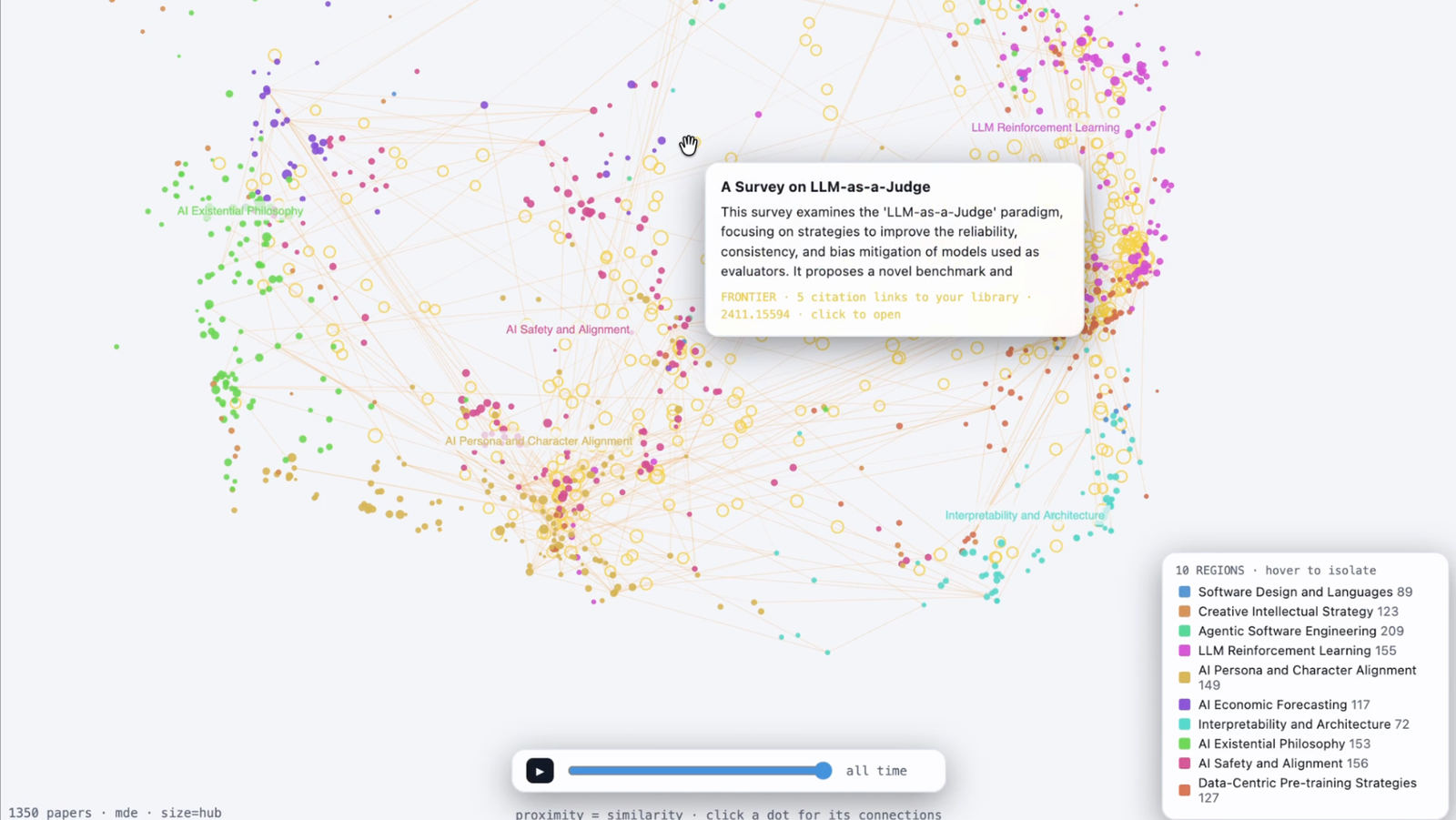
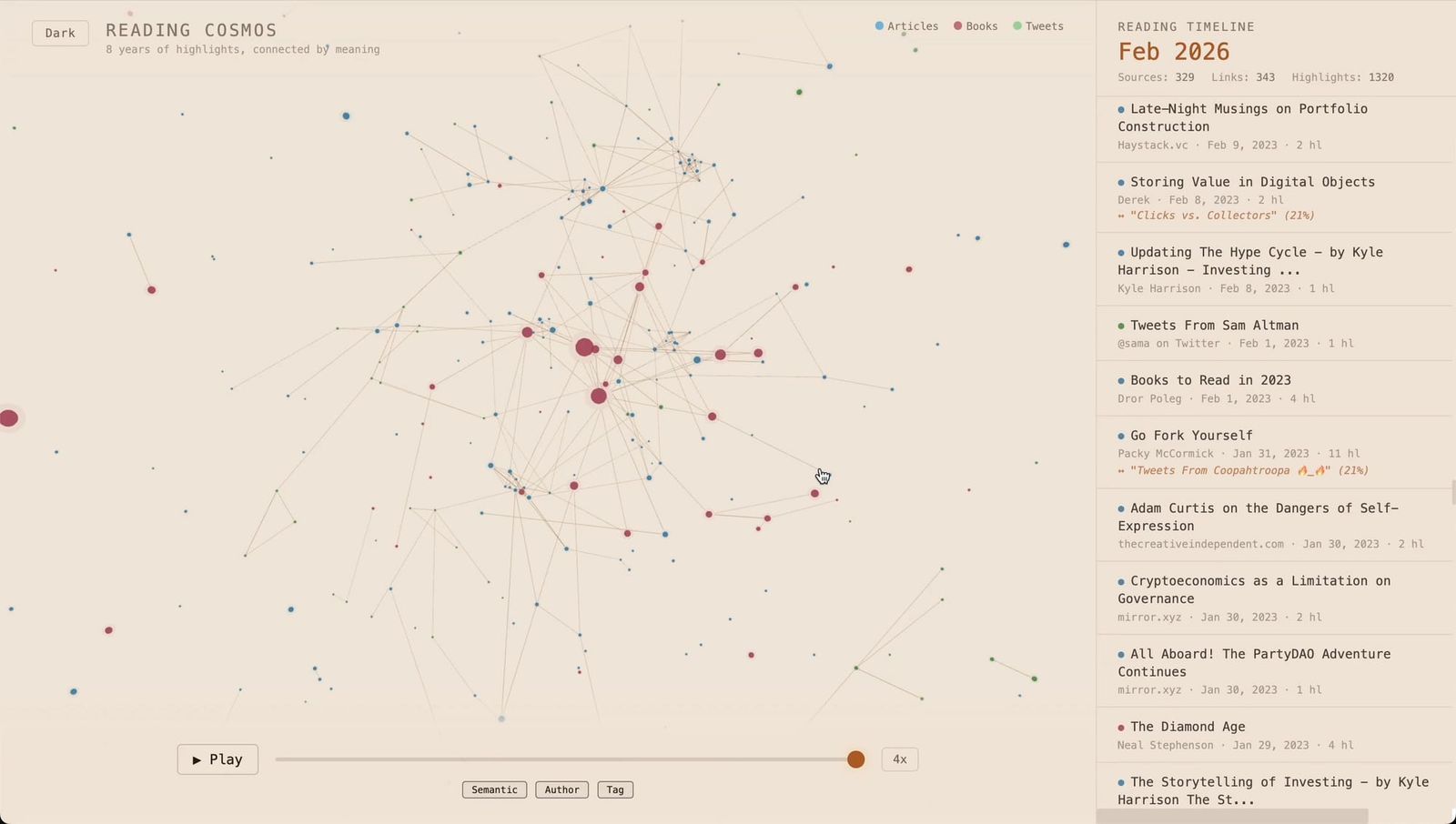
deepfates @deepfates built a web app for exploring their entire Readwise library in semantic space, with help from Claude. Every paper they've saved gets embedded and plotted along axes an LLM labels itself, with citation links drawn between papers, and even a frontier of "ghost papers" cited by their reads but not yet in their library. This is the kind of thing we dreamed people would build on top of their libraries when we opened up the MCP. Timour Kosters In the same spirit, when the Readwise CLI launched, Timour built a "Reading Cosmos": a graph visualization of everything he's saved to Readwise, with semantic links drawn between related notes and a timeline of when each idea entered his library. 👋 FarewellThat's all for now. Thank you again for your patience on this latest update, and you'll be hearing from us with some new announcements much sooner than the last time :) We deeply appreciate your continued support, and as always, feel free to reach out with questions, feedback, or just to share any thoughts you have on Readwise, Reader, and this latest round of updates. Until next time, — Tristan, Dan, and the Readwise Team
|